

NeToRi Phone
Screenshots


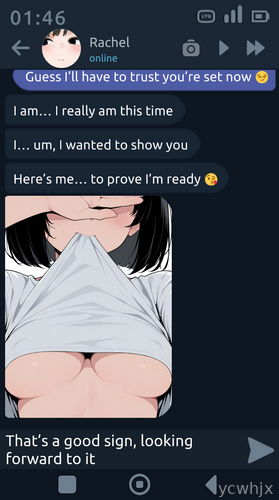

NeToRi Phone Game
On a slow commute or a quiet evening, a light story game on your phone can be an easy way to pass the time without needing full focus. NeToRi Phone turns your Android into a virtual smartphone inside the game, where you go through chats, calls and small decisions that gradually shape the story.
Most of the time you are reading messages, checking in‑game apps and choosing how to respond, so it fits well into short sessions. Progress feels closer to browsing a social feed than grinding levels, which makes it approachable even if you are not a typical gamer.
NeToRi Phone Game Features
Virtual smartphone interface → The whole game runs inside a fake phone screen, with icons, notifications and chat threads that feel familiar right away.
Story-driven messaging → Conversations through texts and calls move the plot forward, so you spend more time reading and deciding than doing complex controls.
Choice-based progress → Dialogue options and small actions can change reactions and scenes, giving a reason to pay attention to what you tap.
Casual session length → Short scenes and quick chats make it easy to play in five to ten minute breaks without losing track of the story.
Simple touch controls → Tapping icons, swiping screens and picking replies are the main actions, so there is almost no learning curve.
Offline-friendly structure → Once installed, much of the experience can usually be enjoyed without a constant internet connection, handy for travel or low-signal areas.
NeToRi Phone Game Highlights
1. Phone-life feel: The design leans heavily into the idea that you are peeking into someone’s phone, which adds a slightly voyeuristic angle to the storytelling.
2. Focus on dialogue: Most of the tension and humor sits inside the chat logs, so people who like reading conversations will get the most out of it.
3. Low hardware demands: Graphics are mostly flat UI elements, so even older Android phones should handle it without major slowdowns.
4. Quick to resume: Jumping back into the game usually drops you straight into the last conversation, so there is little friction when you only have a spare minute.
5. Limited action: Players looking for combat, puzzles or deep strategy may find the experience too passive and text-heavy.
NeToRi Phone Gameplay
Often you start a session by checking new notifications on the in-game phone, then opening chats or apps to see what changed since the last time you played.
Usually the next step is to read through new messages, think about the tone of the conversation and tap the reply that best fits the reaction you want to trigger.
Sometimes a choice will lead to a new call, a different branch of dialogue or a small scene change, and players gradually learn which answers push the story in the direction they prefer.
Just treating it like a casual messaging simulator works well: open it, clear your in-game notifications, make a few decisions and then put it away until the next break.
Often the only real management is keeping track of who you are talking to and what kind of relationship you are building, since the rest is handled by the game’s simple interface.
NeToRi Phone Conclusion
NeToRi Phone suits Android users who enjoy slow-paced, text-heavy games that feel like scrolling through someone else’s messages. The virtual phone setup keeps everything familiar, and the low-pressure choices make it easy to dip in and out around work, study or travel. It is less appealing for action fans, but for people who like story and chat-style interactions, it works as a compact simulation to fill small gaps in the day.










No comments yet. Be the first to share your thoughts!